Wednesday, May 2, 2012

Jacob DeBerti's Tribute To His Father

John DeBerti-Wild About Elk Workshop 2010
 Carol Mulvihill, well known elk enthusiast and outdoor writer attended elk biologist, Jon Diberti's memorial service and was especially touched by a tribute delivered by Jon's son.

Carol graciously agreed to share this with us, so here is the text of her e-mail:

Jon DeBerti, our beloved elk biologist, leaves behind his loving wife Misty and a nine-year-old son, Jacob. The most tender and moving tribute to Jon was delivered at the memorial service, when young Jacob courageously took the microphone and spoke through heartfelt sobs:

 “I just want to say that my dad was very special to me. He loved to take me hunting – especially deer hunting. “He’d want me to wait patiently for a deer to show up, and I’d pester him like heck to shoot the squirrels that were running around the tree stand. I got three squirrels. When we got home, I said, ‘That was great dad, when can we do it again?’ “As you saw in the pictures, I did get my first buck last year on the first day. It was a 6-point. My dad was so happy. It took every ounce of his strength to get into the tree stand, but he did it for me. We waited an hour and 15 minutes for the deer. “He gave all his energy and time to take me hunting.” As he faced the monumental health challenges of his shortened life, Jon kept his family and the time spent with them as his top priority, evidenced by a son who is growing in his image.

Thanks to Carol for giving permission to share this with us. Be sure to read an excellent article by Carol, about Jon DeBerti's career in elk management, which will be published in the May 5th edition of Endeavor News.

Originally published at Pennsylvania Wildlife Photographer by Willard Hill.

Monday, April 30, 2012

Photoshop CS6 Beta-First Impressions

I have shot in camera raw since going digital in 2003.  Initially I tried the Canon software that came with the camera, but this was too slow and clunky, so I switched to photoshop.  Ordinarily I do not upgrade to the latest version of Adobe Photoshop until I am forced to do so. The incentive to upgrade comes when you buy a new camera model and discover that  Adobe Bridge will not open the files.  A prime example is in the case of CS3.  This version of CS supported the Canon 10D, and 40D, but since CS3 had been replaced with CS4, by the time I purchased by 7D in late 2009, I found I was not able to open 7D raw files as Adobe does not offer updates to camera raw for old versions of Photoshop.  Adobe's position on this is that they do not force one to buy the latest version of Photoshop, as they offer a free DNG converter, which converts the raw files from any camera into an Adobe DNG  file, which is a raw file that will open in any version of bridge.  While this does work, it creates another step in the workflow, so I quickly upgraded to CS4.

I broke with this pattern when CS5 came out.  My brother Coy of Country Captures shot JPEGs in his 30D and processed them with the old Photoshop 7, but he decided to change to  shooting raw shortly after CS5 came out.  I watched him working one evening and realized that CS5 was a great improvement over CS4.  For one thing the images from it simply looked much better, and there was greatly improved noise reduction, and sharpening available in the camera raw processor along with other features.  I learned an important lesson at this point as I had been using CS4 much the same as I had CS3 and didn't realize that there were a lot more features available in camera raw, such as the local adjustments window, which enabled one to do dodging and burning, etc.  in camera raw.  I had purchased Scott Kelby's CS3 book, but not the one for CS4.  I bought the book for CS5 and found it to be extremely valuable as it told about new features and improved workflows. To my surprise, some of these were available in CS4 also, but I was locked into the same workflow I used in CS3 and missed  these important features.  The point is that if one does not buy a book, watch online tutorials, or participate in discussion groups, it is easy to get the latest version of software, continue with your ingrained workflow, and miss many of the new features that will improve or simplify your work.

Recently I became aware that CS6 was available in a beta version, which one can test free of charge.  It is essentially a trial version of CS6 extended, but Adobe recommends that once CS6 is launched that one should un-install the beta version and download the actual release version, although it is possible to purchase the serial number and activate the beta version.

At any rate I have been using Adobe Photoshop CS6 beta for over a week and am very impressed with it for the most part.  Perhaps it is just me, but I think there has been a further improvement in image quality since CS5.  Perhaps most noticeable is the change in the appearance of the interface, which now has a dark elegant appearance.

CS5 Interface-Note light grey color scheme

CS6 Interface-dark elegant appearance

 Menu and  Crop Tool Options Bar
It is possible to customize the appearance if one does not like the new interface, but I for one think it is a great improvement and will use it as is.

As is usually the case there is somewhat of a learning curve as some controls are not where one expects them to be. I immediately ran into this with the new and "improved" crop tool.  Perhaps in time I will come to prefer it to the one in CS5, but only time will tell.

The crop tool has several overlay options including the rule of thirds, the golden ratio, and golden spiral, which can be useful aids in achieving a pleasing composition.  I use the rule of thirds in most cases.  This feature was first introduced in CS5, but it only had one overlay option, which was the rule of thirds.  Another major change is that the resolution box is gone in the options bar.  Photo size is still there, but to view the resolution one must click on custom in the options bar, which opens a drop down menu where one can access it, or it is simpler to press the R key, which will open a crop image size and resolution box in the top third of the workspace (at least on my machine).

Another important change is that one can grab any of the corners of the crop box and drag it diagonally.  In all previous versions of photoshop, at this point one composed the photograph by moving the crop box over the photograph,  but now one must move the photo about within the crop box to position the image.  Initially this is very confusing as it is easy to reflexively try to do it the traditional way.  One  can select "classic mode" so that it performs like previous versions, but on my machine it k reverts to the default mode when I close an image, so that I must select classic each time I open a new image.  I think I will adapt to the new method, but I do I hope Adobe puts the resolution box back in the options bar,

Based on my experience to date, I think this is a worthwhile upgrade and I intend to purchase it when it is officially released.  At the time I downloaded the beta version, they said that this would be within 30 days, so it should be before the end of May.

Originally published at Pennsylvania Wildlife Photographer by Willard Hill.

Thursday, April 26, 2012

Passing Of PGC Elk Biologist John DeBerti

John DeBerti Addresses Wild About Elk Workshop 2010
Wildlife Management Director of The Pennsylvania Game Commission, Calvin DuBrock, reports the death of elk biologist Jon DeBerti. Jon lost a ten year battle with cancer on the morning of April 25th. Jon was an important member of the elk research and management team for nearly 18 years. He started as a part-time biologist aide in May of 1994, became a full time biologist aide in 2000, and then became the agency elk biologist in November 2002. Jon was 40 years old.

Memorial Service will be held Saturday, April 28 at 11:30 am at Tri-County Church, 1881 Old 255 Road, DuBois; located about ½ north of Treasure Lake entrance off Rt 255N, turn left onto Hungry Hollow Road, then make an immediate left and go to the top of the hill. http://www.tricountychurch.net/index.html

Jon was well known for his professionalism and dedication to  the welfare of our wildlife resources and he will be deeply missed.

Saturday, April 21, 2012

Eastern Wild Turkey: Jakes Fighting

I have been spending most mornings and evenings photographing the Eastern Wild Turkey Mating season. At this point it seems that due to the early warm spell that we had in late winter and early spring, the peak of the strutting and gobbling activity has passed. In fact I have not seen a mature gobbler strutting in the past week, although I have seen jakes (immature gobblers) doing so. I see a flock of jakes each day and these are some of the most combative birds that I have encountered. If a solitary mature gobbler, or pair of gobblers get close to them, they will attack--sometimes in a flying V military type formation. Sometimes they even fall out among themselves. This happened on Thursday morning, and I  filmed and photographed  the longest gobbler fight I can recall seeing.

Jakes Fighting: Canon 40D-28-135mm EF IS ISO 400

 It all began with a lot of cackling and running about and then one jake grabbed another by the head with the tip of his beak.  I frantically got the video camera positioned and began filming until I captured several minutes of the action and then reached for the Canon 7D and the 300mm F2.8, which was on a tripod beside the video camera in the blind. (I took the above photo hand held at one point to get a still photo that established the scene).  

The heads were the main point of contact between the birds, and the area in which they grabbed each other changed from time to time.  In the photo below the one on the left has his upper beak rammed down the throat on the one on the right.

Headlock:  Canon 7D -300mm F2.8 IS L ISO 640 1/500 sec. f2.8

 For a time one bird controlled the other simply by grabbing it with the point of the beak.  This had to be a painful experience.

Controlling With Beak:  Canon 7D -300mm F2.8 IS L ISO 640 1/800 sec. f2.8

 In the photo below there are four birds.  The one in the back to the left and the one in front are looking on, while the two birds in the previous photo are still connected by the tip of the beak hold.  At times they would also enter the fray and in a few cases turkeys would leap in the air, kick their opponent and beat them with their wings.  I captured some of this on video, but got no good still photos.

 "Come On--Take Him Down!:  Canon 7D -300mm F2.8 IS L ISO 640 1/800 sec. f2.8
  
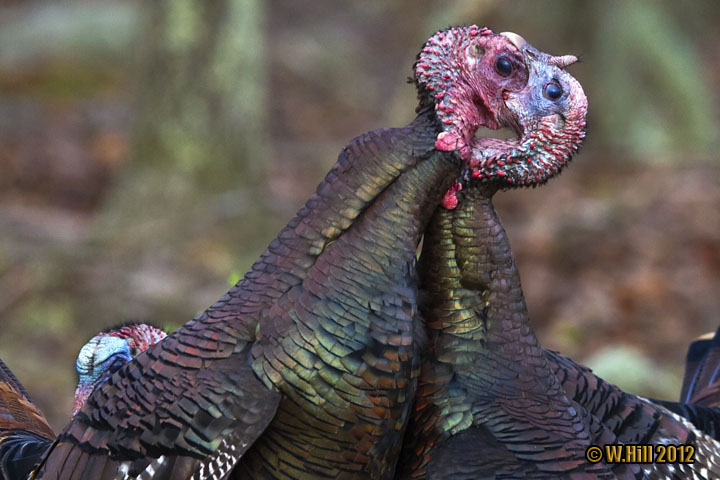
Shortly before the fight ended they walked into an area where the sunlight created a spotlight effect in the forest.  This shows how birds often entwine their necks when fighting.  It reminds one of two snakes twisted together.


 Twisted Together: Canon 7D -300mm F2.8 IS L ISO 640 1/1000 sec. f2.8

In a few more moments one of the birds decided enough was enough, broke away and left at a leisurely pace.  Soon the entire flock began moving slowly to another area and the excitement was over for the morning.

I used ISO 640 as a compromise to get a sufficiently high shutter speed to capture the action, while still having a reasonable noise level in the image.  While ISO 800 is usable with the 7D, I much prefer to stay at 400 or below--although 500 and 640 are not bad. 
Originally published at Pennsylvania Wildlife Photographer by Willard Hill.